
I don’t expect any of you to understand this but it helps sometimes to know how things work on a low level and when we speak about kernel’s you’ll have no idea what it does without understanding some Computer Science fundamentals.
CPU’s understand a very limited instruction set. They can add numbers, subtract, store something temporarily and then manipulate memory (RAM).
When you write code it’s always put down into machine code. Other people have made compilers which turn your lovely print(5+7) to machine code. So what is machine code?
Let’s take look at Assembly Language. This is what is used at the lowest level.
If we want to add two numbers we need to execute the following Assembly Code
        INP  // Take an input
        STA 99  // Store it in RAM slot 99
        INP  // Take another input
        ADD 99  // Add that input to the number in RAM slot 99
        OUT  // Output the sum
        HLT  // Halt the program, we're finished
// Output the sum of two numbers
You can run it here to see an animation of it running each instruction and where data travels through the CPU: https://peterhigginson.co.uk/lmc. In RISC architecture (Reduced Instruction Set Computing) there’s not really any sort of multiplication or modulus. It’s very very simple.
Each instruction from RAM can be executed in a single Fetch, Decode, Execute cycle. This is where the CPU is fetching instructions or data from RAM, decoding it from RAM (depending on the architecture data and instructions can be in the same RAM slot so sometimes it needs to split them, there’s more to decoding too) – executing the instruction, such as LDA A; load “A” into the accumulator – which is the thing that adds up. So if we wanted to do print(5*2) we’d have to do the following:
Let’s look at a JavaScript example of this first:
function multiply(x, y) {
    let result = 0;
    for (let i = 0; i < Math.abs(y); i++) {
        result += Math.abs(x);
    }
    if ((x < 0 && y < 0) || (x > 0 && y > 0)) {
        return result;
    } else {
        return -result;
    }
}

// It being used
let num1 = 4;
let num2 = 5;
let result = multiply(num1, num2);
console.log(`The product of ${num1} and ${num2} is: ${result}`);
As you can see we define a result which we add to by num1, then decrease num2 by one and repeat to do so until y is zero.
Here’s the same code in Assembly Language. Each line is an instruction which can be executed in a single cycle.
        INP  // Take the first input (multiplier)
        STA 99  // Store it in RAM slot 99
        INP  // Take the second input (multiplicand)
        STA 100 // Store it in RAM slot 100
        LDA 0   // Load 0 into the accumulator
        STA 101 // Store 0 in RAM slot 101 (result)

LOOP:
        LDA 100 // Load multiplicand into accumulator
        BEQ END // If multiplicand is 0, go to END
        ADD 99  // Add multiplier to result
        STA 101 // Store new result
        LDA 100 // Load multiplicand into accumulator
        SUB 1   // Decrement multiplicand
        STA 100 // Store new multiplicand
        JMP LOOP // Jump back to LOOP

END:
        LDA 101 // Load result into accumulator
        OUT     // Output the result
        HLT     // Halt the program
Now we understand how the JavaScript code works lets use it to help us decipher this Assembly. I’ll be referencing the variables we used in our JavaScript code to help you.
- You can see it first defines the RAM slots for each part of the program;
num1,num2andresultin JavaScript. - It then loads up
num2into the accumlator (a part of the CPU which adds numbers) - Checks if
num2is zero (BEQ– branch if equal to zero to theENDblock of code)- If not adds
num1to the result.- It then stores the new result
- Loads up
num2into the accumulator - Decrements
num2by 1. - It then overwrites
num2with the updated number - Jumps (
JMP) back to the top ofLOOP:where it will start again untilnum2is equal to zero
- When
num2is equal to zero it immediately jumps to the theEND:block - It then loads the result
- Outputs it
- Exits program
- If not adds
Note that
LOOPcould be called anything, it’s just a name.
Here you can see how instructions from the RAM telling the CPU what to do:
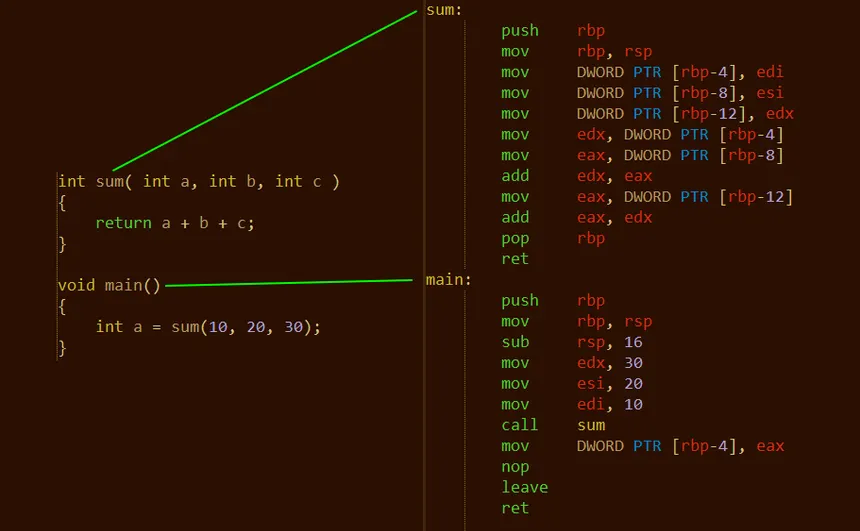
Here you can see this C code being put into instructions which are added to RAM and then executed by the CPU.
More detail on RAM, decoding and Program Counters
For our purposes RAM is just a list of instructions. RAM can be encoded in different ways but I’m going to abstract this a little so it won’t be truly accurate but it’s not far off. Please study the diagram below.
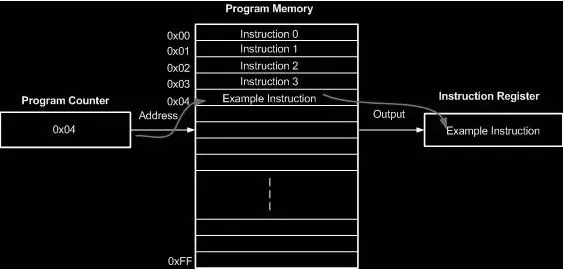
So you can here that instructions for the memory are stored in a list. Each instruction has an address attributed to it along with the instructions. This is so when we JMP we can actually go to the specific RAM address.
The CPU has a counter called the Program Counter or PC. This is usually incremented after each instruction. But sometimes instruction such as JMP tell the CPU to set the program counter to something else.
After execution the CPU then checks the program counter, which points to the address in RAM, it then finds the address in RAM, fetches the instruction, decodes it and then executes it.
The decode step allows us to take take the binary encoded program address and instruction (or sometimes just a value like the number 22) which is bundled together and then separate them into two.
Time slicing
Now let’s say you have two processes running on your computer at such as working out the Fibinacci sequence and working out Pi. I’m not sure why your computer would be doing these things but you never know! The CPU doesn’t just do the Fibiniacci sequence and then try to workout Pi. It utilises something called time slicing where it does some intructions from one and some from the other. Your CPU can do billions of fetch decode execute cycles a second so it appears that they’re happening at the same time. Of course there is threading so we can run more than one thing at once but that’s quite complicated for our purposes.
Did you know that when your clock speed for your processor says 2.5Ghz that means it can do 2,500,000,000 clock cycles/second!!!
Overview
I understand that’s a lot of information that’s been condensed down into a few paragraphs. It tends to take a very long time to learn these things properly and there’s many many many more complicated steps involved like pipelining. However this is a very good abstraction that allows you to understand the low level concepts that will allow you to unlock so much more knowledge later on.
What’s a kernel
I am glad you asked!! Now you understand the concepts above, even loosely this will make more sense. The kernel is the interface between hardware and software. It deals with things like time slicing, telling your CPU what order to do things. In the case of the Linux Kernel it also handles device drivers so it knows how to interact with lots of different CPU’s, network cards, RAM etc. There’s software and packages on top the this that are installed and they make up your operating system.
Dockerrrrrrrrrrr
Wow! We’ve got pretty far. Well done! I’d just like to touch on Docker before going any further to ensure everyone is on the same page.
Disclaimer: this isn’t a comprehensive explanation of Docker but rather something intended to fill the knowledge gaps of those who are already acquainted with it. Therefore if none of this makes sense to you don’t worry it’s not your fault, I just do not have enough time to go over everything I’d like to.
What is a virtual machine
You are running a virtual machine right now! The desktop environment in your browser emulates all the hardware, processors, operating system etc. Each virtual machine has the full operating system on it with everything that operating system can do such as networking, bluetooth packages, etc.