
Here we’ll look at discovering exposed secrets in projects and how to defend against them.
Hunting down secrets in GitHub repos!
There’s plenty of ways to discover API keys, private keys and other treasures and not just by scanning through repositories. Inspecting the API’s, URL interpretation and looking at the frontend code are just a handful of ways to grab those precious keys! We’ll look at some of these later but for now we will scan GitHub repos to see if any secrets have been leaked in commits.
What is Trufflehog?
To do this we’ll be using an open source tool called Trufflehog. Trufflehog can do some very clever things. We’ll be looking at two functions:
- Scan a specific GitHub repo
- Scan all repos for an entire GitHub user/ organisation
Trufflehog with iterate through all of these and identify potential and verified exposed secrets.
Installation
There’s several ways to run Trufflehog however the easiest way is to either install it on MacOS with brew install trufflehog or to run it with Docker (requires Docker to be installed and setup) docker run --rm -it -v "$PWD:/pwd" trufflesecurity/trufflehog:latest github --repo https://github.com/trufflesecurity/test_keys *This might require super privileges i.e running with sudo.
You can also find instruction to compile it from source and run it from their GitHub – https://github.com/trufflesecurity/trufflehog. I will be running it using Docker but this is just a preference.
Scan a single repo for exposed secrets
To scan a single repository you can run docker run --rm -it -v "$PWD:/pwd" trufflesecurity/trufflehog:latest github --repo https://github.com/trufflesecurity/test_keys or trufflehog github --repo https://github.com/trufflesecurity/test_keys if you installed it.
Scan all repos under a user or organisation
This command is an absolute gold mine. To run it use docker run --rm -it -v "$PWD:/pwd" trufflesecurity/trufflehog:latest github --org=foundersandcoders or trufflehog github --org=google-deepmind.
Things to note
Trufflehog has unverified and verified secrets. Unverified means it could be a false positive and although it might be an API key, Trufflehog cannot be sure. Conversely a verified secret is confirmed to be a positive reading and definitely something of interest. Here are a few other things to bare in mind:
- Trufflehog can login to repos using SSH and Docker if they’re private
- It doesn’t just search .env files, it searches your code for embedded API keys too
- Can output JSON if you want it to
- Has the ability to work with local repos or check things before you push
- Has the ability to only output verified secrets and ignore unverified ones
- So much more – checkout the README here on their Github.
How to hide your secrets
I think the most common cause for exposed secrets is a misconfigured .gitignore file as opposed them being hardcoded or extracted through complex attacks that hack into the server.
Another one is people sharing them in plain text over places like Discord, email etc.
Let’s look at some basics of the .gitignore file
What is the .gitignore file
For those of you that are unaware the .gitignore file typically lives in the root of your project and dictates what files are excluded from git commits. Typically these will be generated automatically if you’re working with tools that generate a basic skeleton for you. They’re useful for hiding node_modules directories and .env files.
Syntax such as:
# .gitignore file

node_modules
.env*
!.env.example
!.env.local
This file ignores all folders and files named “node_modules” in any directory as well as any file starting with “.env” such as “.env.prod”. The exclaimation marks act as a negate operator which creates an exception. This means that “.env.local” and “.env.example” will be included in git commits.
Sharing API keys securely
If you have to share API keys please do not share them over plain text messaging services. In fact don’t share them using messaging services at all. If your account is compromised it could lead to severe consequences. If you reuse your password then there’s even more cause for concern. If a service you’ve used has been breached and your password has been leaked then attackers can try that password on other accounts. You can check your email at haveibeenpwned.com for data breaches. Most of these leaked password can be found floating around on the internet if you know the right places to look. I suggest using 2FA and specifically an authenticator app or yubi key.
There’s a service called One Time Secret which allows you to enter some text and then generate a link which can access that text. When the link is accessed the secret is deleted.
There’s an open source version which you can self host called Enclosed. This allows you to create a secret, encrypt it with symmetric encryption and even change the time it expires, if it should be deleted when accessed and you have the ability to attach files. I host an instance here.
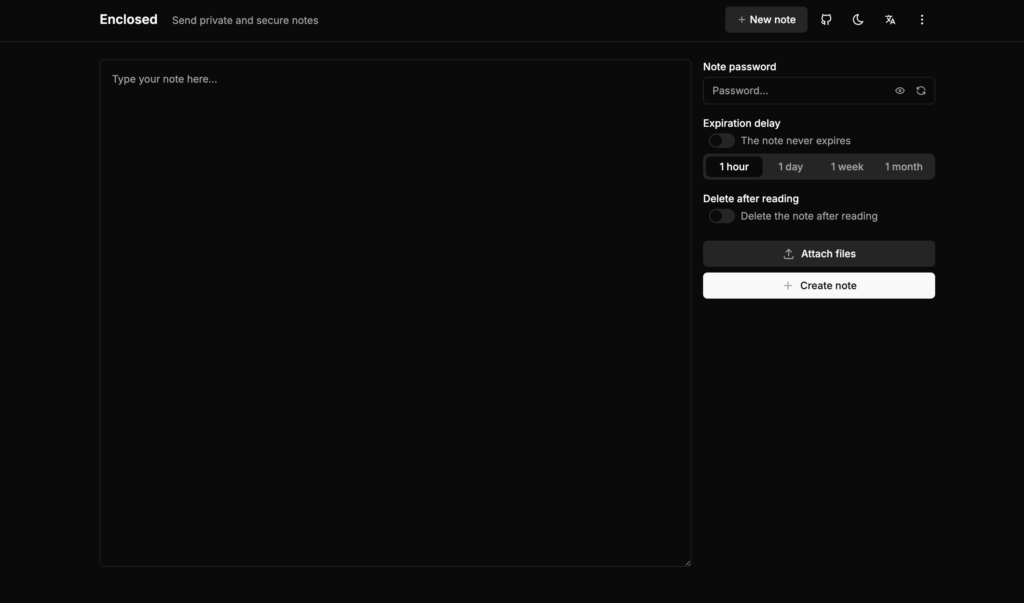
Alternatively you could just use something like PGP – however this is a little less user friendly.
Dealing with exposed secrets
It’s important to note that if you’ve already exposed secrets, .gitignore won’t remove these from your commits. When you’ve committed something it’s basically permanent – unless you want to rewrite history which is messy!
If API keys are exposed you need to revoke them immediately!!!
You then need to purge commits if you can run an audit on anything that could have been accessed check if sensitve data has been exposed etc. There’s a great open source tool which can make this really easy called BFG Repo Cleaner but you can also just use git filter-repo.
Legally you need to notify users too if they’re information has been breached.
As a general rule you should have API keys rotate every 90 days minimum. Rotating API keys can automatically solve this. Many API key providers support them.
A note about Svelte
Svelte handles environment variables really well. It automatically prevents any environment variable from reaching client side code unless they’re prefixed with “PUBLIC_” such as “PUBLIC_ANON_KEY”. Anything without this such as “ANON_KEY” will not be allowed to be exposed client by Svelte and can only ever be used server side. Very clever indeed!